Showing posts with label photography. Show all posts

Monday, 14 July 2014

The Power of Selenium

  I've spoken many times on this blog of how much i enjoy working a negative until i get the final print that i want.  I love working out the dodging and burning for different areas of the print and thinking about the toning i want to do to complete it.  That being said, this print was an absolute killer.  Once again it is from my recent holiday away to the eats cast of England to enjoy the pleasant life of a fishing village for a week.  I have been here many times before and fancied some new spots to shoot so i had a quick look around online before i headed out.  A little bit of research revealed a somewhat hidden bay on the coast complete with rock shelves and nabs (a nab is an outcrop of rock which the sea has not eroded - think stack).  Perfect!  We ended up going there for a day midweek and had a fantastic time walking the dog and relaxing on he sand and rocks.  Of course, i had my Bronica kit with me and was going a bit trigger happy.  I took this shot low to the ground with a nice shapely rock in the foreground and a distant nab and cliff in the background.  The sky seemed good so marvelous, i could burn that in as much as need be upon my return to the darkroom.

  After i developed etc i setup a flat print (after determining the best overall exposure using split grade test strips) i got a flat print exposure.  And it looked rubbish.  So, off i went exploring my dodging and burning options - sheet after sheet after sheet after sheet of paper was used (i was using Slavich Unibrom for it's cold tone and nice heavy weight).  I got a print i was semi happy with and decided to tone (after a wash of course).  I copper toned for a short period then put it into selenium - after a few minutes large white spots started to appear (this is where we learn to selenium tone before copper) so i scrapped it, deciding it didn't look right anyway.


  No amount of dodging and burning that i did made the print look right.  I wanted something dark and i just wasn't getting it.  Perhaps i'm just not at the skill level to do that kind of print yet - hopefully one day i will be.  It's prints like these that really test me!

This is the best i got alas.
   After hours of trying and eventually running out of Unibrom i knew it wasn't happening - i just couldn't get any "pop" out of the print.  I decided to clear my mind and approach it from a lith point of view.  Sometimes, if i'm honest, lith feels like a bit of a cop-out.  I suppose that's because i'm not spending hours configuring dodging and burning charts, i'm just picking an exposure and slapping some paper in a tray.  There is more skill to it than that, and there's nothing wrong with dodging and burning for lith - a fact i had to reassuring myself with.

  Now one of mankind's oldest questions - which paper to use.  After much deliberation i decided to go for Fotospeed Lith paper as i knew it would give me a dark feel and suitable colouring.  So, i picked my exposure and developed until the sky had good detail.  After snatching, fixing and washing i was left with this:

  Good, i thought, but not quite there.  The shadows are a bit...green..!  As is usual with my lith prints i like to see how they react to selenium toner.  In this instance i chose a dilution of 1:5 as i knew it would give more of a colour change than a weaker ratio.  I popped the print into the tray and it went nuclear!  The shadows got absolutely obliterated, the sky darkened dramatically and almost all detail was lost in the foreground rock.  I felt crushed - all that hard work wasted.  I decided to let it dry and think about my next step.

  After a few days of moping about and being busy with work i went back to look through my prints and you know what - i decided i liked the final print i got.  I was suitably dark and it was moody.  It probably isn't going to go down in history as one of my greatest prints but i like it so i decided to leave it there and move on to another negative.  But then again - looking at the above photo of my pre-toned print, i'm liking that as well...


  One thing we learn - never underestimate the power of selenium!


Wednesday, 21 May 2014

How To: Make a Print Washer on a Budget

  Ah the early stirs of summer, the time when a man decides to re-open his toolbox and turns his mind to possibility.

  I'm tired of washing my prints in the kitchen sink.  It's just too small and i can't leave it alone because the prints sink to the bottom, block the tap; the sink fills and my kitchen starts to flood.  And woe betide me if i decide to print some 12 x 16 paper!


  Suffering from the same problem?  Lo, read on to see how you can make an inexpensive (really, it cost me about £20 in total) print washer.

  First off, materials.  Here's what you will need:

        • Plastic storage container (any size you like),
        • 2 x 2 metre lengths of plastic waste pipe (any diameter you fancy),
        • Some 90 degree joints that will fit your pipe (get about 8),
        • Hosing/tubing (approximately 2 metres),
        • Drill
        • Saw
        • sandpaper
        • Glue gun/silicon sealant
 So how do we build this washer i hear you cry?  Keep reading:

Step 1

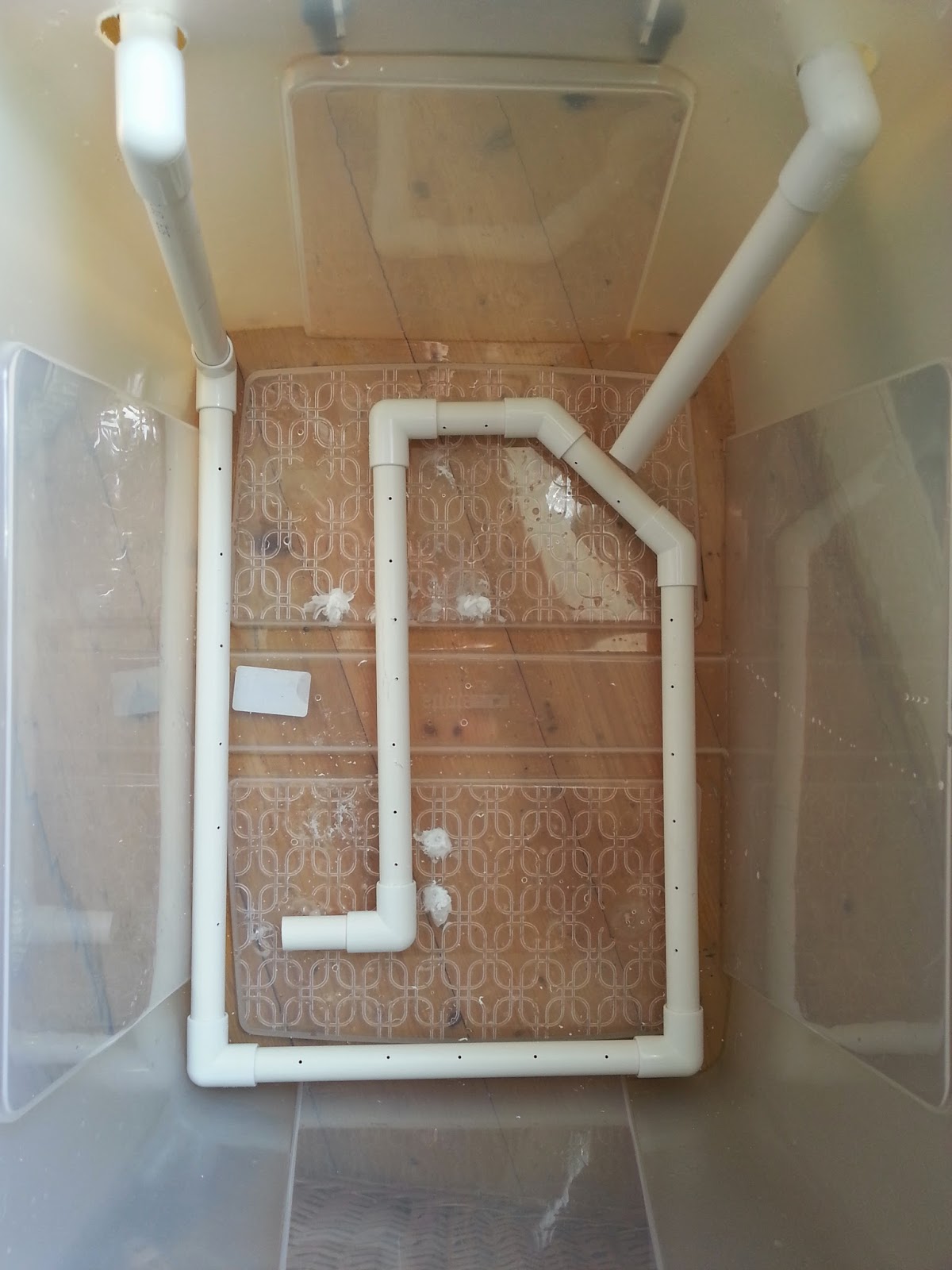
  Grab your storage box (mine cost about £11 and can easily fit in 12 x 16 prints) and drill 2 holes roughly the same diameter as your waste pipe just an inch or so below the top of the container towards the left and right hand side.  To do this you may have to use a hole cutter (its like a round saw which you mount on your drill).  Unfortunately i didn't have a hole cutter the right size so i drilled my holes bigger.

Step 2

  Cut a small section off your pipe and feed it through the hole on your nearest side, push on a 90 degree joint (making sure you sandpaper down the edge you have just sawed) and then attach a vertical section of pipe which extends just shy of the base of the container.

Step3

   Now do exactly the same with the other hole, but this time saw the tip of the pipe at about 45 degrees to get a spout.


Step4

  Now go back to your first length of piping and measure along the base of your container then cut a length of pipe just a little less than the length you measured.  Smooth off the sawed edges of the pipe with sandpaper and attach it to the pipe you already have.

  At this stage i tried attaching a length of hose to cover the base of the container but it didn't quite work out.  Instead, keep attaching lengths of pipe and joints until you get good all round coverage along the base of the container.  You dont need to cap off the last piece, this will serve as an outlet for the water which flows through the system.

Not like this!

Like this!
Step 5

  Now take your drill and (using a small drill bit) drill holes every 2 inches or so apart along the entire length of the tubing which is sat in the base of the container.

Step 6

  Retreat to the bathroom (or wherever you're planning on setting up this washer) and check out your taps.  If you have the kind of taps you can just push hosing onto then all well and good, connect a length of hosing from the first piece of piping onto your taps.  This will mean water will flow in, down the vertical length and through the loop you have made in the base of your tub; flowing out from the last length to be picked up by the second vertical pipe which will act as a siphon.

  Now, my taps are mixers which means i cant push any hosing over them.  But, i can unscrew the shower and push the hosing onto the screw attachment (yay).

Like so!
Step 6

  Attach a length of hosing onto the second pipe and point it plugwards.  Turn your tap on and you should see water spurting out through the holes you have drilled and the container will start to fill.

  You should see some good agitation in the water as the container starts to fill (which is exciting isn't it).

Step 7

  Now, remember i drilled my holes for the pipe inlets bigger than the pipe?  I'm going to need to seal that up.  Take some plastic (e.g. from a bottle) and cut out a square which more than covers the holes you cut.  Cut out a hole as close to the diameter of the pipe as possible and use a glue gun or some silicon to attach the plastic to the container, with the pipe running through it.  If you don't do this then the water will just leak out of the holes you made and the second pipe won't act as a siphon.

Step 8

  Once that's all done you will have to ma the tap for a while to get the right flow.  Keep adjusting the amount of water coming out of the tap until what's going in matches what's heading out of the second pipe.  It helps to drill a small hole in the top of the second pipe and stick a match in it.  The match can be used to increase and decrease outflow.  Preferably you don't want the water to flow out over the top of the container.

Step 9

  The final step is to make something to support your prints.  It should be easy enough to source some acrylic or perspex sheets, cut them to size, attach them to some rods and put that in the tank.  As i already have a Paterson drying rack, however, i decided to use that.  These are cheap and come up relatively often on Ebay.


  And that's about it.  It's not the most hi-tech thing ever created but it's cheap and cheerful and should wash your prints sufficiently (i can't guarantee that of course).  It's certainly better than flooding my kitchen!

  The way it works is that the water flows in and goes through the loop at the base.  The drill holes allow water to spurt out which agitates the water, causing motion around the prints.  The water picks up the fixer and, as fixer-laden water is denser than clean water, it sinks to the bottom of the container.  It should then be picked up by the outflow pipe and siphoned out down the drain.  Science!  I haven't technically finished mine yet as i haven't sealed up the original drill holes so my siphon isn't really working but it will.  IT WILL I SAY!  Just for fun, here's a super-entertaining video of mine showing this mega-agitating washer in action (caution: may cause your mind to blow, it's that exciting):


  So that's it.  A print washer for those of us on a budget.  Those hundreds of pounds you have now just saved can go on something better like film, paper, chemicals or (woe of woes) rent!  As always keep printing and ill see you again soon.


Friday, 31 January 2014

Thankyou Eddie!


  Have you ever had a moment of pure coincidence, where you were in the right place at the right time for something great to happen?  I had one a few months ago – it was early May and Jess and I were out celebrating our 2nd wedding anniversary (how time has flown).  We had had an expensive month what with moving house and Jess changing jobs so we didn’t really want to go away for a break.  We decided to just have some nice time off to relax and enjoy each others company.  We had a few outings, one of which included a shopping trip to Manchester.

  Even though i’m a manly man with a manly mans beard, i do enjoy a shopping trip.  And when you get to spend it with your beloved even better (see how i am laying on the affection – although soppy this will earn me darkroom time at a later date).  We wandered round for hours, pottering around the usual shops, enjoying our time together.  When you live in Preston, Manchester is like shopping heaven – which brings me to the focal point of this tale.  Manchester houses the closest analogue camera/darkroom store to where i live, namely the Real Camera Co (yes i am aware Calumet have a store in Manchester also, but it isn’t in the city centre is it).  Whenever i am in the area i make a point to pop in, even if i don’t need anything.  The chance for me to go into such a store is a such a rarity that to pass it up seems foolish.  No amount of googling or apugging can ever make up for seeing cameras in the flesh.  Hasselbalds, Mamiyas, Bronicas, leicas, Graflexes etc  are all lined up ready to be drooled over.  

  They also have a nice little book section to peruse through.  I decided to have a pick through as darkroom books are always a treat to have and you never know, there may be a few hidden gems.  Eventually i stumbled upon a book called Creative Elements by Eddie Ephraums.  I wasn’t familiar with his work but i bought the book anyway as it was on a couple of pounds and it seemed interesting.  Only when i got home and started reading did i realise the magnificence of what i held in my hands!  If you are unfamiliar with this book i recommend you go onto amazon immediately and fork out the paltry sum of £2.04 so that you too can own it.  Unlike other darkroom books Ephraums takes a number of his own images and talks you through what he did from setting up the camera, developing the film and creating the final print.  He includes his dodging and burning charts, and most importantly he reveals his mistakes throughout the process.  

  The best part of this book, however, lies in what Eddie shows us can be done with a "mediocre" negative.  Almost every developed film has at least one frame (be it landscape, portrait or whatever) that is dull, flat and lifeless.  Whilst we usually pass these by in favour of “superior” negatives, Ephraums shows us that these frames should not be so forgotten.  

  Take, for example, the following three frames (sorry about the quality, they are just mobile phone pictures taken straight from the book):


   If i had these shots on a negative, i'd probably play around with them for a while but then end up moving on to something else.  Now look at what Ephraums did with these shots (again, sorry about the quality):


  A complete transformation!  By effective use of dodging & burning, creative choice of paper grade and use of toning & bleaching, Ephraums is able to completely change the look and feel of the image.

  And that is something i hadn't really come across before.  Naturally i had read and seen may examples of dodging and burning etc at work, but i had never considered how they could be used so  extensively in completely changing an image.  Which i guess is where 'art' and 'expression' come into photography.  This revelation led me to look back over my old negatives.  Unfortunately the reason most frames on my old negatives didn't get printed was because of scratches, fingerprints and blemishes on the emulsion.  However, i remembered the roll of film i had recenty shot on a day out with a friend.

  We had gone up to Ribblehead so that i could take some photos and he could paint the majestic viaduct.  The weather was grey and overcast with sunny spells so i didn't hold out much hope for getting any great photos.  But still, it was nice to be out for a day with a close friend.  We took an appropriately oversized picnic, set up our chairs and took in the beautiful scenery.  The moors of the Forest of Bowland and Yorkshire, although quite bleak, are beautiful places which are often overlooked by many in favour of the Lake District.

  Unfortunately the viaduct was very popular with walkers that day so i couldn't get a clear shot.  Also some moron thought it was fine to drive his van down the footpath and park right in front of the viaduct, thus saving himself 5 minutes of walking time.  I didn't really visualise having a bright white van in the foreground of my final print!  On another note, why oh why do people use trekking poles when walking along the flattest and widest footpaths in the world?  The only time you need to use trekking poles are if your walking up a mountain.  And i mean a mountain, not some little hump in the Lake District!  Anyway, i decided to leave Daniel painting and go for an explore of the local area.  I found a few small caverns and limestone pavements, but nothing that i fancied shooting.  I looked to the horizon and saw a distant hill, small and long, with fields in the foreground and some nice clouds in the sky above it.  I thought "what the heck", setup my tripod, composed and exposed.  I only shot two frames that day which felt wrong, but at least i had a good time doing it.

  Fast-forward a week or so and my film is developed and dry (i used up the rest of the roll a few days later on a day out with Jess).  By the way i promise i don't just go out all the time - i do some work too!  Anyway, the film was dry and i did a quick contact sheet.  A few frames looked promising so i stored that information in my head for when i got a chance to print.

  Friday.  Jess is out at a wedding all day and it looks like she's not getting home until late.  That means i've got at least 2 hours after work for some quality me time.  Into the darkroom i go.  I didn't really fancy doing any lith printing and i was in a landscape mood so i reached for the Ribblehead and Bowland negatives.  I decided to give the hill shot a try, even though it looked a bit dull and uninteresting.  Everything was a flat grey and seemed a bit "meh".  I decided to have a quick thumb through Ephraums book to get some inspiration before i cracked on.  A few test strips and proofs and i was in the area with my base exposure.  I did a few more strips for dodging and burning and then tied it all together onto one print. A bit more work required.  A little more dodge, a little more burn and then suddenly a decent-looking print started to appear.  A few sheets later and i had a print i was very happy with indeed.

  I decided to switch from RC to FB paper as i wanted the look FB gets with the sepia-selenium toning i had in mind.  I adjusted my exposure accordingly and compensated for drydown.  A few minutes later i had the print in my hand and it looked good.

  I ran into the kitchen and set the tap running whilst i set up my toning gear.  I previsualised sepia and selenium for the final print so i laid out my trays.  After the wash i slid the print into the bleach for around 8 minutes, pulling it just as the shadows were starting to lose density.  I didn't want to bleach back the whole way because then the selenium would have nothing to work with.  A quick rinse and then into the sepia for a few minutes.  The print turned a lovely sepia tone, better on the FB paper than it would have been on RC.  Once toning was complete i did another wash and then put the print in the selenium.  I used a mix of 1:9 as i only wanted a slight colour shift.  The shadows went a deep brown and the sepia highlights and midtones turned from a yellow to a deeper, richer brown which was exactly what i wanted.

  After leaving the print to dry i was left with exactly what i wanted;

  Compared to the original flat print the final print is so different and i'm really happy with it.

  So what do we learn from this long and winding tale?  Never ignore a seemingly dull or uninteresting negative.  With a little work and dedication you can breathe new life and energy into an image.  Plus, everyone loves seeing a complicated set of dodging and burning plans written down don't they?!  And it feels good to really work at a print and shape it.

  All that is left for me to say is "thankyou Eddie", without your book i may never have unlocked the potential of many of my negatives.

Monday, 28 October 2013

Improving the Shed Darkrom

  If you've been reading this blog for a while you'll know that my darkroom is in a converted shed.  If you want to convert your own shed you can see how i did it here.  My current door situation has been really annoying me however.  I have strips of velcro all round the inside of the door frame to which i attach some thick blackout plastic.  The problem i have been having is that on hot days the heat is melting the glue from the sticky back of the velcro strips and so the blackout sheet is falling down.  It's just been a real pain to have to keep detaching and reattaching it every time i go in and out of the darkroom.

  When i first created my shed darkroom i had some spare chipboard sheets left over from paneling out the inside, and i had told Jess i was going to use them to create inner doors for the shed.  Well, that was months ago and ever since Jess had been dropping not-so-subtle hints that she wanted that wood out of the dining room.  As Jess was away at a wedding all day Saturday i decided to pull my finger out and gets these doors built.

  The first thing to do was measure the inner door frame, which for my shed was 1.00 x 1.65 metres.  Alas my leftover sheets of board weren't the right size, i would have to make 4 pieces and hinge them together, but that's ok - better than buying new wood.  So, i trimmed the bottom half of the doors into two sections, and the top half also.


  After making sure all 4 sections fit together roughly it was time to lightproof the seams.  I picked some weather insulation strips up from Lidl a few weeks ago for this purpose and so set about sealing up the relevant parts of the doors.


  After applying the seal to the bottom left section of the door i screwed it into the frame (i only want the right side of the door to be openable).  I did the same for the top left section, making sure i put some seal between the two so that the seam between them would be light-proof.
  Next i started to fit the bottom right section.  If you do end up doing this then make sure you raise the bottom section up a little, otherwise the base of the door will scrape along the floor.  Once i had made sure the section fitted i screwed the hinges onto the left section, attached the right section (making sure it was raised slightly) and attached the other side of the hinge.  Make sure you put some sealant between the two pieces, running down the hinges.

  Then i did the same with the top section, making sure to push the sealant strips into all the nooks and crannies of the wood.
  After going inside and shutting the door i noticed a few small light leaks on some of the seams, particularly around where the door shut.  I bought some wider foam strips from Lidl and put these around the edges where the leaks were.
  I folded some thick rubble sacks that i bought from B&Q ages ago and stapled these over the centre seam to block all remaining light.
  To hold the door shut tight against the light seal i bought some clips from the hardware shop and placed three down the length of the door.
(google images picture - not mine!)
  I just noticed this morning that some of the thicker foam has started peeling away as the adhesive on the back isn't very strong.  I may have to superglue it down.

  So, that's the door sorted, but i still have a little wood left.  I decided to turn my attention to the electrical outlet port, aka the hole in my shed through which i feed my extension cable.  Up until now i had been using a sheet of wood which i roughly shoved over the hole and then from the inside i stuffed some clothes to seal up the hole.  Not the best.  I had a hinge left over from the doors so i cut a small rectangle of wood and attached the hinge.  I smashed off the raised exterior of the vent hole so it was flush with the shed wall.  Then i attached the hinged wood to the shed.

  I cut a square out of the flap so that i could feed the cable through and the flap would lay flush to the shed side.  I also put a foam seal around the back of the flap and attached another clip to hold the flap shut.


  I should probably staple some plastic over the flap as when chipboard gets wet it tends to disintegrate.

  And that's it - a lightproof shed for a few hours work.  The doors should also help with insulation, especially with winter so close.  Hopefully this has given you some hints, tips and ideas for starting or improving your own darkroom.

Substitute Graduates

  I'm sure (or i hope) that many of us have been in the situation where we've ordered new chemicals, they've arrived and then we've realised we forgot to order more graduates and bottles etc.  If, like me, you live nowhere near a darkroom supplies shop and you need to mail order everything this causes a problem because let's face it - noone wants to pay postage costs.

  Well fear not for Tesco has come to the rescue!  In some of the larger Tesco's they stock beer fermenting supplies.  Included in this are 100ml graduates such as this one:

  It only cost around £3 but saved me from having to pay postage and wait for my order to arrive.  I may even go back and buy a few more - you know, just in case...

Thursday, 12 September 2013

The Long Silence: Part 2


  A couple of weeks ago I wrote a post about exploring a local abandoned mental asylum and said I would follow up with more pictures.  Well, after hours of scanning, rescanning, stitching, rescanning, stitching, colour balancing, rescanning, stitching and re colour balancing (I hate Photoshop) I have finally managed to scan my prints and get the scans to look (almost) like the prints.  I really should learn not to print bigger than 8 x 10 because my scanner can’t fit the print in and my computer struggles to run photoshop (I really need to get round to wiping it and reinstalling everything).

  First things first though, a little bit of history (Wikipedia based of course).  Construction on the asylum began in 1869 as the three Lancashire asylums in Prestwich, Rainhill and Lancaster were deemed to be full.  It was designed by Henry Littler, Architect to the Lancashire Asylums Board.  It officially opened in April 1873 and had an initial capacity of 1000 inmates.  Within the grounds were a church, a chapel, a large recreation hall and a farm estate.  In 1878 a new annexe was started to the north of the hospital and this was completed in 1880.  This allowed a further 115 patients to be housed and a dedicated Post Office to be created onsite.  Shortly thereafter in 1884 a sanatorium was established in the hospital grounds to cater for patients with infectious diseases.

  In 1892 works began to provide electric lamps throughout the grounds and another new annexe was started, followed by another in 1912.  By 1915 the hospital housed 2820 inmates, more than double the original capacity.  The Whittingham Hospital Railway which was used to transport coal, goods and staff between the hospital and Grimsargh was closed in June 1957.

  When the First World War struck a new annexe was commissioned to cater for war casualties.  Patients who died were buried on a private cemetery within the hospital grounds.  When the war ceased the hospital returned to private use.

  In 1923 the decision was made to change the name ‘Whittingham Asylum’ to ‘Whittingham Mental Hospital’, presumably to make it sound a little less imposing.  When the Second World War struck the hospital was again used in treating victims of the war.  In 1948 the hospital was renamed to ‘Whittingham Hospital’ after it became a part of the newly formed National Health service.

  In the late 60’s meetings were held with senior staff to discuss complaints of cruelty, ill-treatment and fraud within the hospital.  Those who held the meetings were then threatened with actions for libel and slander.  Eventually the Hospital Management Committee intervened and began inquiries into the allegations of corruption and abuse.

  The hospital eventually closed in 1995 and the hospital still sits there, fenced off.  Plans have been in progress for a number of years to build new homes on the site, but as yet have not been finalised.

  That’s the history, now let’s take a look inside.  I have included the 2 pictures from my previous post just for the sake of completeness.  As previously stated I decided to use the lith process on these prints as the high contrast and graininess would really complement the textures within the decaying buildings.  I used Agfa Brovira paper as it retains highlight detail really well when lathing and you can get a wide variety of print tones depending on developer dilution and life.  I hope you enjoy:


Monday, 29 July 2013

How To: Print Colour Negatives (RA4)


  RA4 printing is a lot easier than people credit it to be.  Although tricky to get to grips with at first, once you are used to the procedures involved it is rewarding and enjoyable.  It’s easy to get carried away with black and white printing and not give colour it’s merit.  True, black and white is much more variable what with toning and split grade printing etc, but sometimes you just want a little colour in your life.

  The main reason i print my colour negatives is because i hate scanning.  I don’t think flatbed scanners can get the detail, correct colour and saturation of a negative.  Many times i have printed a shot and scanned i as well so i could compare the two.  I can never get my scans to look like my prints, they are often oversaturated, have a dodgy colour cast and just don’t look like they should.  If i had a drum scanner then i’m sure that wouldn’t be a problem!

  It’s worth giving RA4 printing a try at least once, just so you know what is involved and what you can create on your final print.  So, let’s get on into it.

What you will need

  If you already develop your own colour film and have an enlarger then you have likely got all you need to print RA4.  I should state here that there are a couple of ways you can develop colour prints.  I will be using my Jobo rotary processor but it is possible to develop the print in trays.  I haven’t done that before so i can’t really comment on it.  As far as i am aware all you need to do is extended the processing times, but don’t quote me on that.  So, let’s run through a quick list of what you’ll need:

·         RA4 printing chemicals (i use a Rollei Digibase 3 part kit)
·         RA4 paper (such as Kodak Supra Endura or Fuji Crystal Archive)
·         Enlarger (preferably with inbuilt colour filters – failing that you will need to buy some colour filters)
·         Jobo rotary processor with print drum/developing trays
·         Kodak viewing filters (not necessary but they come in handy)
·         Bottles/graduates/thermometers etc

Step 1 - Chemistry

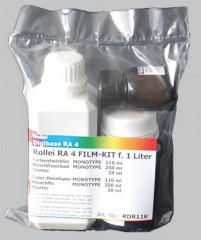
  Ok, you’ve got your gear together.  The first thing you need to do is fill your Jobo with water and get it heated up to 37.8 degrees, just like your C41 film.  While that’s heating up let’s get our chemicals mixed.  The Rollei RA4 kit is inexpensive, lasts ages and gives good results:

  It comes in 3 parts – starter, developer and bleach-fix (blix).  On each bottle is mixing instructions to make 1 litre of working solution.  Now, when i am printing i only like to make few prints at a time.  If i mix up a litre of working solution it is going to expire long before i use it up.  I like to split my chemicals down into smaller batches so i can do five or so prints at a time.  The Jobo drum i use requires 120ml of solution to process the print properly.  So if i divide the mixing instructions by 8 i can get 125ml of working solution per batch.  A bit of maths is involved but it’s worth it so you don’t waste any chemical.

  So, take your mixing instructions, divide by 8 and then you will have your 125ml batch for your first run.  What isn’t included is a stop bath to go between developer and blix.  You can use water but i prefer using a black and white stop bath (in this case Ilfostop).  Mix up 125ml of stop and add it to a clearly labelled bottle.  Put this bottle as well as your developer and blix bottles in your Jobo both and leave them to get to temperature.

  When using a Jobo patience is key.  All too often when i first started home processing film i would only leave my Jobo for twenty minutes or so and that just isn’t long enough for it to get heated up to a level temperature.  You need to leave your Jobo for an hour minimum.


Step 2 – The Darkroom

  While your chemicals are heating up it’s time to head into the darkroom.  Clean your negative and holder in the usual way and load them into your enlarger, get your box of paper out and ready (but don’t open it).  If you are using under-enlarger colour filters get them ready.  Take your Jobo drum, remove the top section and look inside.  You will notice the drum has a cross section that looks like this:


  One deep ridge at the top, 3 at the bottom.  Make sure these ridges line up with the corresponding ridges on the drum base or you will struggle to load your paper.  If this is your first time printing RA4 you’re going to need to put some practice in here as you will be leading the paper into the drum...in the dark!  That’s right – no safelight allowed when it comes to colour!  That means you are going to be fumbling about blindly – if you haven’t rehearsed that’s going to be tricky!  So, grab and old print and your drum and have a few practice runs loading.  For this tutorial let’s say we are printing 8 x 10.  Take your paper (use an old print) and bend it gently lengthways into a semicircle, making sure you don’t fold or crease the print.  Imagine putting a poster into one of those long cardboard tube, that’s the motion were going for.  Make sure that the emulsion side is facing into the print, not the drum wall otherwise you wont get a good development.  Shut your eyes and feel for the top ridge with your fingers.  Align the long side of the print along this ridge and then feel for the other length of the paper.  Gently push this paper into the wall of the Jobo drum and you will feel the edge hit the left hand of the three ridges.  Your print should now be nice and secure.  If it feels loose have a grope around, you may have aligned it with the bottom or right ridge.  Open your eyes and take a look, if your print is sandwiched between the top and left ridges then well done you!  If not then keep practicing!  It may take some time but soon this action will become second nature.

  So, you’re now competent at loading your drum.  Time to setup for a test strip.  Open your lens wide and focus your image (see my black and white printing tutorial).  If you look on your box of paper you will be a suggested filter pack.  Dial in the settings either using your built-in filters or your under-lens filters (usually it’s around 40 magenta 50 yellow – written as 40M 50Y).  Set the f-stop you want to print at on your enlarger lens.  Now, lay your paper and drum within easy reach and turn off all room lights and safelights.  Wait a minute or so for your eyes to adjust.  If you can see light block it out as it WILL affect your print.  Once your room is fully dark find your box of paper and take out a sheet.  Feel for the side with the emulsion on (if glossy it should be obvious, if matt it normally has a slightly rougher texture than the paper backing).  Put your paper into you enlarger easel and grab your card to run a test strip (card is used to sequentially uncover a section of paper so you have varying exposures on one sheet – again, see my black and white printing tutorial).  RA4 printing requires much shorter exposure times than black and white so running a strip from 0 to 10 seconds should be more than adequate.  Once your test strip is done, find your print drum and load the paper just as you previously practiced.  Put the lid on, make sure your paper box is closed and then fumble for the light switch!  Now it’s time for...

Step 3 – Processing

  Your chemicals should now be nice and warm at 37.8 degrees Celsius so it’s time to get processing.  We’ll start with a prewash, follow that with the developing and stop, then rinse again, blix and final rinse.  The whole process takes just over 5 minutes so it’s relatively quick.  Processing times are as follows:

                                                Prewash: 30s
                                                Develop: 45s
                                                Stop: 30s
                                                Rinse: 30s
                                                Blix: 45s
                                                Final Rinse: 1:30s (change of water after 45s)

  If you develop your own film then you will be used to the process, it’s very similar – just shorter.  After your processing is complete take a deep breath and remove the lid of your drum.  Peel the print away from the drum wall and you should have a test strip, much like this:


  You will notice that your print has blue shadows.  As always, prints are best evaluated when dry so grab a hair dryer and blast it.  The good thing about RA4 paper is that it dries rapidly.  Once your print is touch dry your shadows should have lost the blue and gone black.  

Step 4 – Evaluating the print

  You will likely see a strong colour cast, probably magenta.  Ignore that for now – we want to get our exposure correct first.  Look over your print and see which exposure gives you good detail in both highlights and midtones.  It all depends on what you want your final print to look like of course.  Once you have chosen your exposure time make a note of it.  Leave your print and head back to the darkroom.  Dial your chosen time into your enlarger and follow the previous steps to make a straight print at your chosen time.  Process as usual and dry it out.

  Look at the print closely, still ignoring the colour cast.  Is the exposure correct?  Does it have good detail in critical places?  If you’re not happy with it go back and make a new print with a different exposure, be it longer or shorter, until you’re happy.

Step 5 – Altering the Cast

  This is the first print i came up with from my test strip.  As you can see it is too dark and too magenta:
  We will now use filtration to add or cancel colour to the print.  This is where viewing filters come in handy:

  We can look through the viewing filters at our print and see how it changes the colour.  For example, the above print is too magenta.  The opposite of magenta is green, so if we look at the print through the green viewing filter we will see the magenta cast reduce.  Each viewing filter has 3 windows with varying strengths of colour.  This helps to narrow down the filtration you will need to get a natural coloured print.  

  If you don’t have any viewing filters then that is no problem, it is still relatively simple to make adjustments.  The general rule is add/subtract 5cc (colour filtration is measured in cc) for a small adjustment, 10cc for a moderate adjustment, and 20cc for a large adjustment.  The most important thing to remember is that to reduce a colour you must increase filtration.  Remember that!  In this example we want to reduce the magenta so we would add magenta filtration.  I made another print and added 40cc of magenta (a drastic change) so you can see what happens:

   
  We end up with a very green print indeed!  Clearly too drastic a change.  I reduced the magenta filtration by 20cc (so +20cc from the original) and added 5cc of yellow to cancel out a slight blue cast i still had in the shadows.  I also decreased exposure so as to bring out more detail in the shadow area beneath the window.  This sacrificed some colour and detail in the trees and sky outside the window, but it made the print feel more natural overall:

   
  The best thing now is that this filtration can be used throughout the rest your roll of film.  When you try another frame from your negative you filtration should be in the ballpark area.  You may have to make a few small adjustments depending on your print, but the filtration should be pretty close so make sure you keep a written record of it.

Summary

  So that is pretty much the process.  A basic tutorial but it gives you everything you need to get going in RA4 printing.  I have described the procedure step by step once you get accustomed to the process you will alter exposure and filtration as you go.  It is also possible to dodge and burn colour prints, and even alter filtration whilst dodging and burning so you can alter the colour of one part of the print.  But to be honest it’s a huge pain.  My exposure for my final print above was just over 2 seconds.  Imagine trying to dodge and burn in a fraction of a second!  I suppose if you are printing on much bigger paper like 16 x 20 then your exposure would be longer which would help, but in all honesty I haven’t needed to dodge or burn a colour print yet which is a relief!

  There is a great sense of achievement when you finally get the print that you want.  Although long-winded and often frustrating, colour printing is a rewarding process which I urge you all to try at least once in your lives!  Happy printing!